
Compression instructions below
How do I create split ZIP files?
Below are step by step instructions for creating multipart ZIP archives using ezyZip.
-
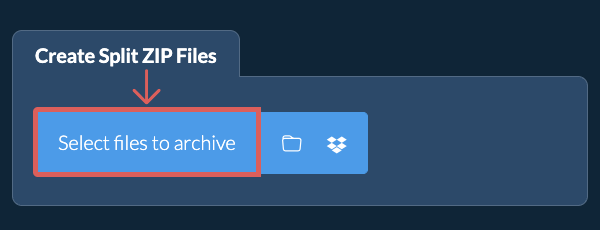
Select Files to Archive To add files to your ZIP archive, you have two options:
-
Click "Select files to archive" to open the file chooser
- Drag and drop files directly onto ezyZip
Click "Select files to archive" to open the file chooser -
-
Choose Split SizeOnce you are happy with the files you have selected, click "Choose Split Size".
-
Set Compression Level(Optional) Set the desired compression level by clicking the down arrow next to "Create Split ZIP Files" button.
-
Create Split ZIP FilesSet the maximum size of each ZIP split file. Click "Create Split ZIP Files". It will start compressing the files.
-
Save Your Split ArchiveClick "Save" to save individual ZIP parts or click "Save all" to save all the ZIP parts to a destination folder.
More how-to guides
-
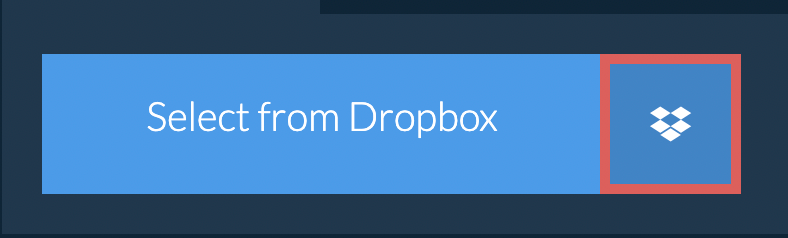
Select from DropboxClick the down arrow (▾) next to the file selection button, then choose "Select from Dropbox".
-
Pick your filesA small ezyZip window opens. Click "Continue to Dropbox", sign in to Dropbox if asked, then pick what you want to compress.
-
Compress your filesezyZip downloads your selection into your browser. Then follow the instructions above.
-
Save to DropboxWhen your file is ready, click the down arrow (▾) next to the save button and choose "Dropbox". The first time, Dropbox asks you to allow ezyZip access.
Files are saved in the /Apps/ezyZip folder.
-
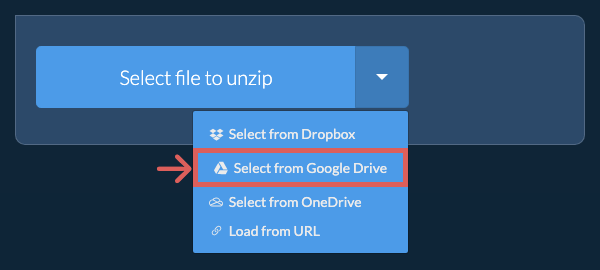
Select from Google DriveClick the down arrow (▾) next to the file selection button, then choose "Select from Google Drive".
-
Sign in and pick filesA Google Drive window opens. Sign in to Google if asked, allow ezyZip to access the files you choose, then pick what you want to compress.
-
Compress your filesezyZip downloads your selection into your browser. Then follow the instructions above.
-
Save to Google DriveWhen your file is ready, click the down arrow (▾) next to the save button and choose "Google Drive". Sign in to Google if asked.
Files are saved in the My Drive/ezyZip folder.
-
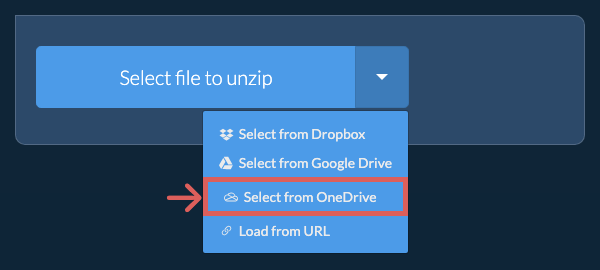
Select from OneDriveClick the down arrow (▾) next to the file selection button, then choose "Select from OneDrive".
-
Sign in and pick filesA OneDrive window opens. Sign in with your personal Microsoft account if asked and allow ezyZip access, then pick what you want to compress.
-
Compress your filesezyZip downloads your selection into your browser. Then follow the instructions above.
-
Save to OneDriveWhen your file is ready, click the down arrow (▾) next to the save button and choose "OneDrive". Sign in with your Microsoft account if asked.
Files are saved in the Apps/ezyZip folder.
Frequently asked questions
ezyZip is an online tool that supports any OS that can run a modern browser. We have tested it to work with Windows, MacOS, Linux (e.g. Ubuntu, Mint, Debian), Android, ChromeOS (Chromebook), iOS (iPhone, iPad & iPod Touch).
We are continuously updating the system, so ensure you are using the latest version of one of the popular browsers or their variants. (e.g. Chrome, Firefox, Safari, Opera).
Please let us know via the feedback form if you have any issues.
We are continuously updating the system, so ensure you are using the latest version of one of the popular browsers or their variants. (e.g. Chrome, Firefox, Safari, Opera).
Please let us know via the feedback form if you have any issues.
A multipart ZIP file is a single ZIP archive that has been split into multiple parts, each with a sequential extension (e.g.,zip, .z01, .z02, etc.). This format is commonly used to break up large files into smaller, more manageable pieces for easier sharing and storage. Multipart ZIP files can be created using ezyZip online split ZIP tool, allowing you to split and combine ZIP archives quickly and securely.
ezyZip is a collection of online file management tools, including this free multipart ZIP creator. Unlike other online file compression tools, ezyZip runs locally in your browser, ensuring your privacy is protected. You can create multipart ZIP files quickly and securely without uploading your files to a server.