
Recovery instructions below
How do I recover a forgotten RAR password?
-
Select File To select the RAR file, you have two options:
-
Click "Select RAR file to crack" to open the file chooser
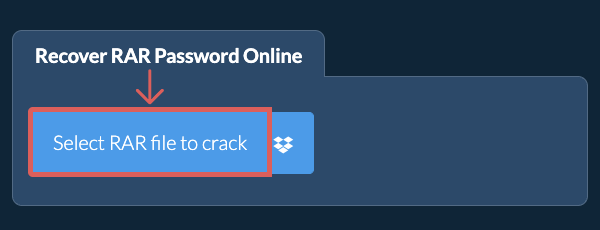
- Drag and drop the RAR file directly onto ezyZip
Click "Select RAR file to crack" to open the file chooser -
-
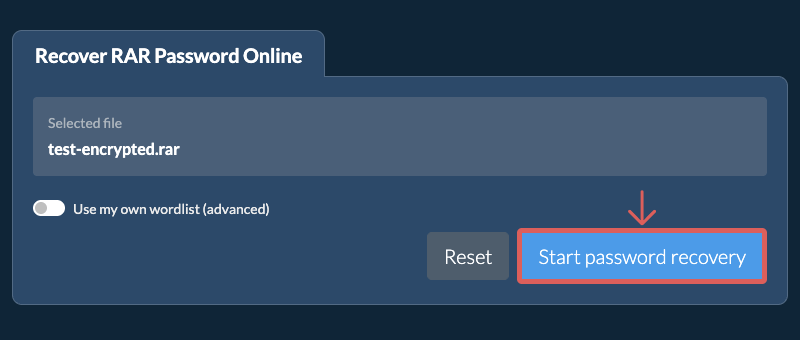
Choose Wordlist (Optional)(Optional) Turn on "Use my own wordlist" and choose a plain text wordlist file (.txt, .lst or .dic). Otherwise the built in wordlist is used.
-
Start RecoveryClick "Start password recovery". ezyZip tries each password from the wordlist in your browser. This can take a while, and it can only find a password that appears in the wordlist.
-
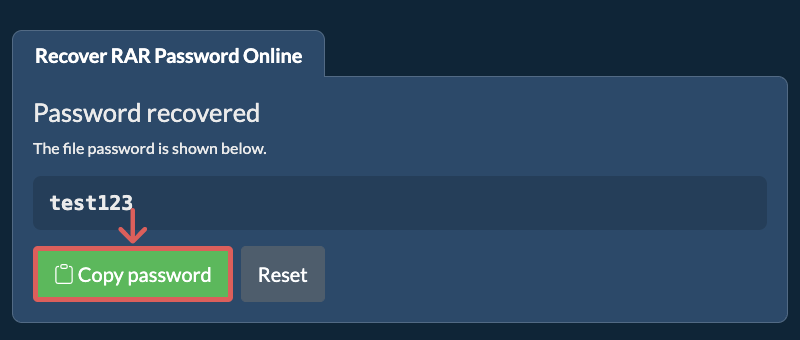
Copy PasswordWhen a match is found, the recovered password is shown on screen. Click "Copy password" to copy it.
Frequently asked questions
ezyZip uses a wordlist (dictionary) attack. It reads the encrypted RAR file and tries each candidate password from a wordlist until one unlocks the file. Everything runs locally in your browser, so no files are uploaded. Because it only tests words that are in the wordlist, it works best for common or guessable passwords.
A wordlist attack can only find a password that appears in the wordlist. If the password was not found, it was not in the list. You can try again with your own, larger wordlist of likely passwords. Long, random passwords are unlikely to be recovered.
Yes. Password recovery runs entirely in your browser using WebAssembly. Your file and your wordlist are never uploaded to a server, so your data stays on your device.
ezyZip is an online tool that supports any OS that can run a modern browser. We have tested it to work with Windows, MacOS, Linux (e.g. Ubuntu, Mint, Debian), Android, ChromeOS (Chromebook), iOS (iPhone, iPad & iPod Touch).
We are continuously updating the system, so ensure you are using the latest version of one of the popular browsers or their variants. (e.g. Chrome, Firefox, Safari, Opera).
Please let us know via the feedback form if you have any issues.
We are continuously updating the system, so ensure you are using the latest version of one of the popular browsers or their variants. (e.g. Chrome, Firefox, Safari, Opera).
Please let us know via the feedback form if you have any issues.
ezyZip is a free online tool that can recover a forgotten password from an encrypted RAR file by trying candidate passwords from a wordlist, one by one.
Unlike other online tools, ezyZip runs locally in your browser, so your file never leaves your device and your privacy is protected.
ezyZip processes files directly in your browser. Unlike most online tools, your files are not uploaded to our servers, which means faster processing and better privacy. Take a look at the feature comparison below and we think you'll agree that ezyZip is the better choice for your file conversion needs.
| Feature | ezyZip | Other Online Tools |
|---|---|---|
| No Software Installation | Works Directly in Browser | Works Directly in Browser |
| Processing Location | Your Browser (No Upload) | Their Servers (Upload Required) |
| Privacy & Security | 100% Private (Files Never Leave Your Device) | Files Uploaded, Accessible by Others |
| Processing Speed | Fast (No Upload/Download Time) | Slow (Upload + Process + Download) |
| Registration Required | Never | Often Required for Large Files |
| Works Offline | Yes (After Page Load) | No |
| Cost | 100% Free | Free with Limitations / Paid Tiers |
| Established | Since 2009 (15+ Years) | Recent (May Disappear) |